

Someone searches "storage units near me", picks one of the first three results and rents a unit within a week. Around 823,000 people a month search that phrase in the US alone (Semrush, US database). You do not need a big budget to be one of those three. Eleven free tools cover your Google My Business listing, your self storage website, your keywords and even whether AI tools such as ChatGPT name your facility. This guide shows what each tool does and how to use it to get more calls, direction requests and unit rentals in 2027.
Which free tools help you grow a self storage website and Google My Business in 2027?
Eleven free tools do most of the work: three for your Google My Business listing, four that show how your website performs, and four that find keywords and fix problems. The table shows what each one is best for. Pink marks the tools for your listing.
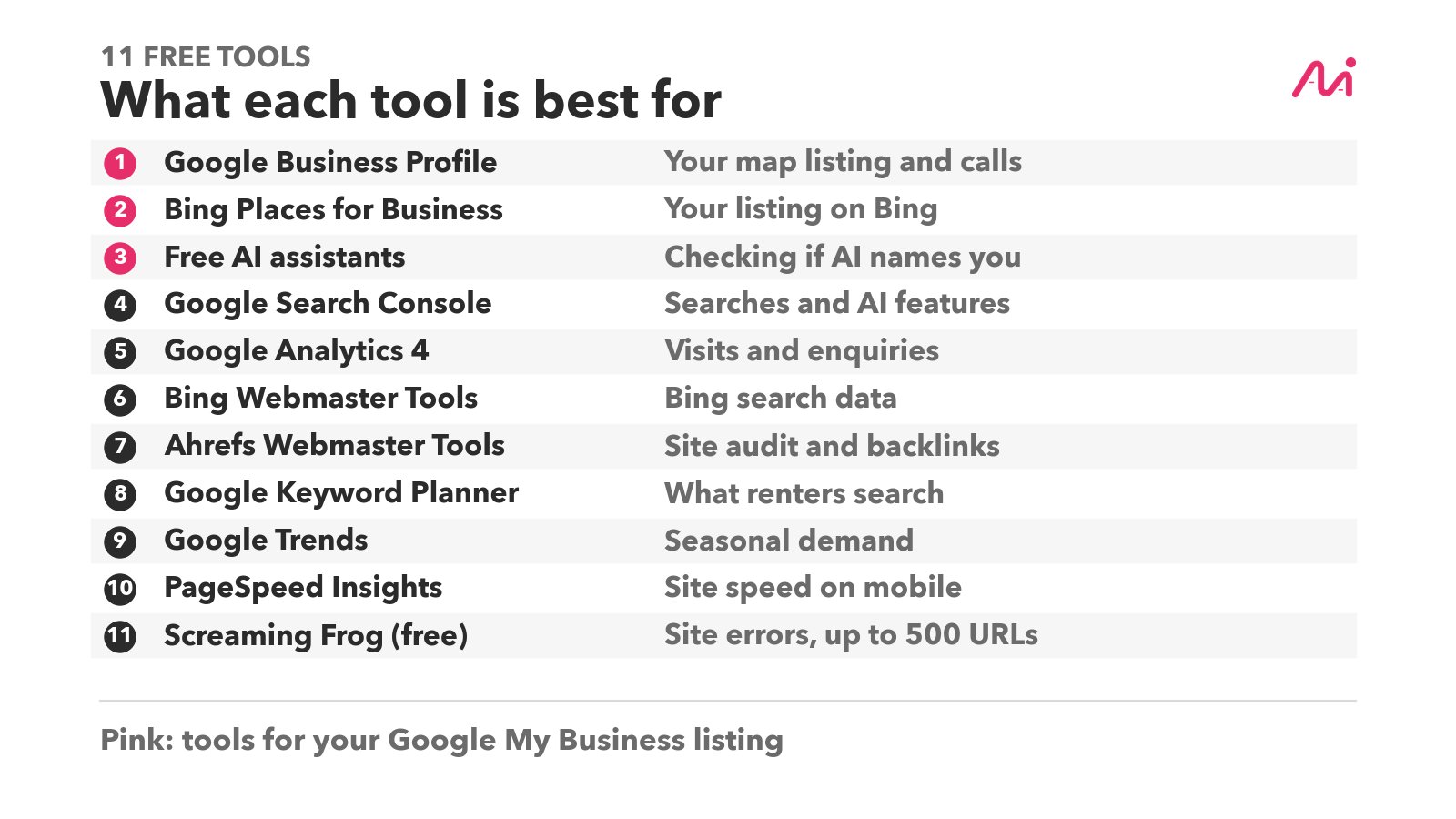
Which free tools grow your Google My Business listing?
Three free tools cover your listing: Google Business Profile (the new name for Google My Business), Bing Places for Business and a free AI assistant to check how your business is described.
1. Google Business Profile (Google My Business)
Google Business Profile is the free listing that shows your facility on Google Search and Google Maps. It is the most important tool on this list, because your primary category, distance, hours and reviews decide who appears in the top three map results. Our guide to Google My Business for self storage covers how to rank 1st.
- Complete every section. Add your real business name, address, phone number, opening hours, unit sizes, photos and a link to the matching location page.
- Post every week. Use the Posts feature for offers, news and events, such as a first-month discount or student storage at term end.
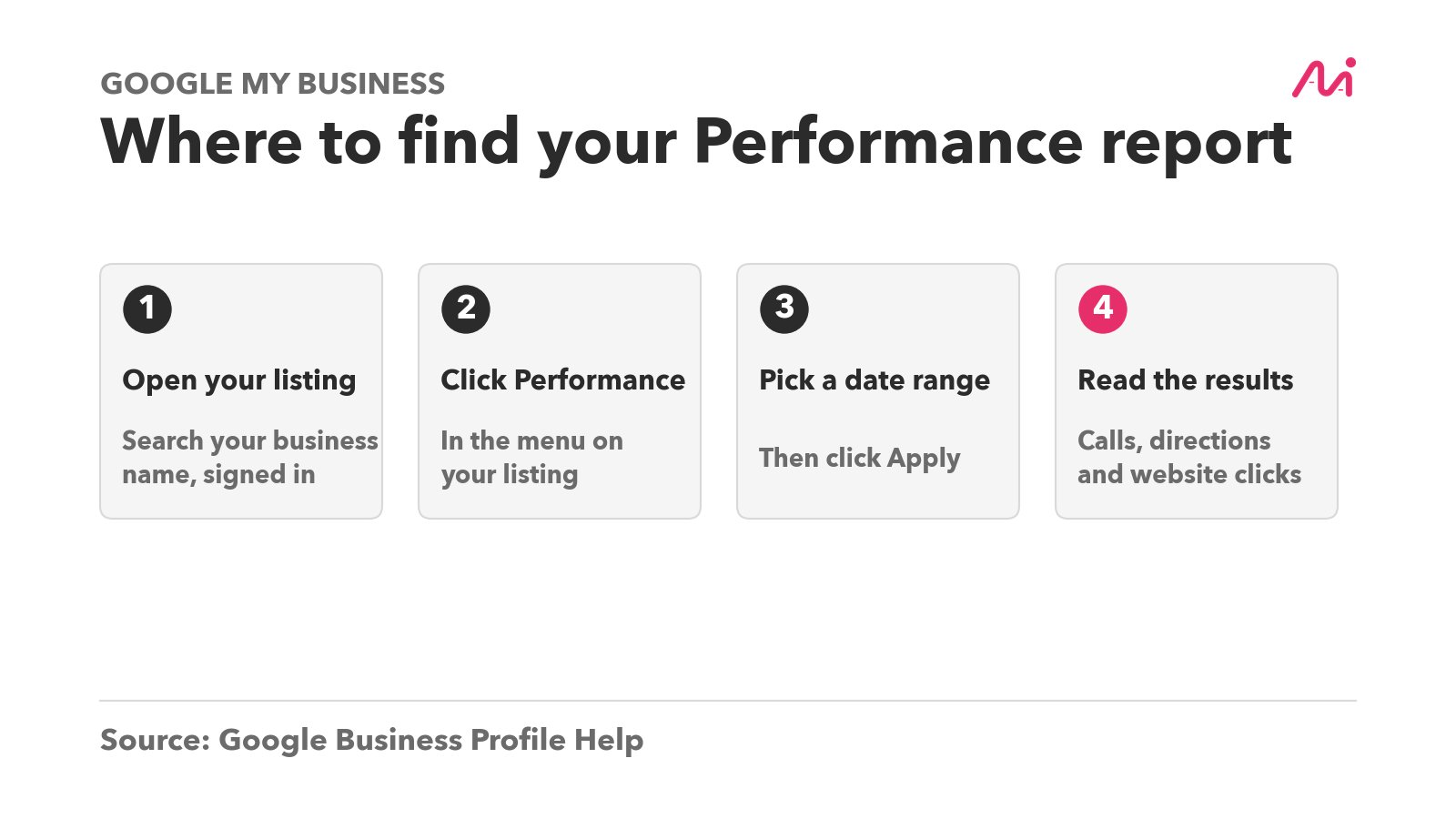
- Read the Performance report each month. It shows calls, direction requests and website clicks. This is your scoreboard.
- Reply to every review and send tenants a direct review link after they move in.
2. Bing Places for Business
Bing Places is Microsoft's free version of Google Business Profile. It puts your facility on Bing search and Bing Maps, and you can usually import your Google listing instead of typing everything again.
Sources disagree on whether ChatGPT reads Bing Places directly. Several marketing sites say it pulls local business data from Bing Places. Search Engine Land reported that ChatGPT does not see the profile data businesses manage in Bing Places, and Whitespark's research says Bing listings influence the web results ChatGPT looks at. Our view: claiming the listing costs you nothing and adds a trusted source for your name, address and hours, so do it, and do not expect a direct feed into ChatGPT.
- Claim and import your listing, then check that your name, address, phone number and hours match Google exactly.
- Add photos and your location page link.
3. Free AI assistants: ChatGPT, Gemini and Claude
The free plans of ChatGPT, Gemini and Claude show you what a renter sees when they ask an AI tool for a facility. A Yext study of 6.8 million AI citations found 44% came from business websites and 42% from business listings, so your listing and website are what these tools quote.
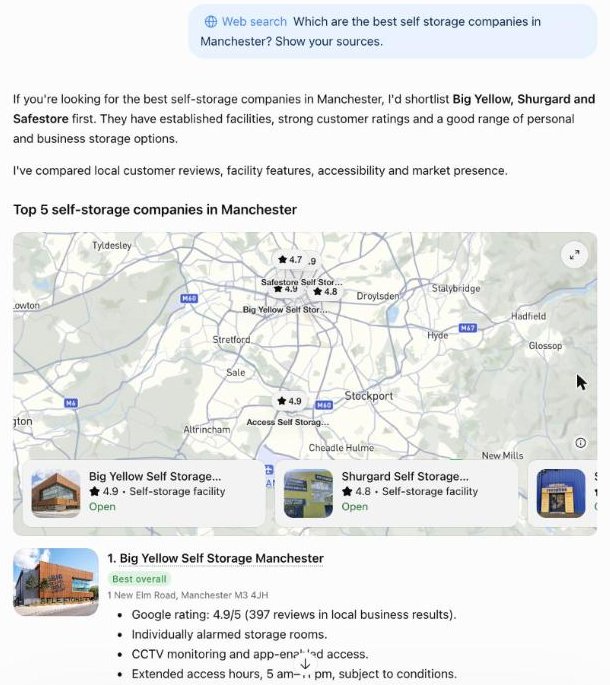
When we asked ChatGPT for the best self storage companies in Manchester, it showed a map with Google star ratings and review counts next to each listing. That makes your reviews and listing details part of your AI visibility.
- Ask the same questions each month: "best self storage in [your town]", "cheap student storage in [your town]" and "storage units near [landmark]".
- Write down whether you are named, which sources it shows and what it says about your prices and hours.
- Fix what is wrong at the source: your listing, your location page or a directory.
Which free tools show how your self storage website performs?
Google Search Console, Google Analytics 4, Bing Webmaster Tools and Ahrefs Webmaster Tools show how people find your website and what they do next. The first three come from search engines and the fourth from an SEO company.
4. Google Search Console
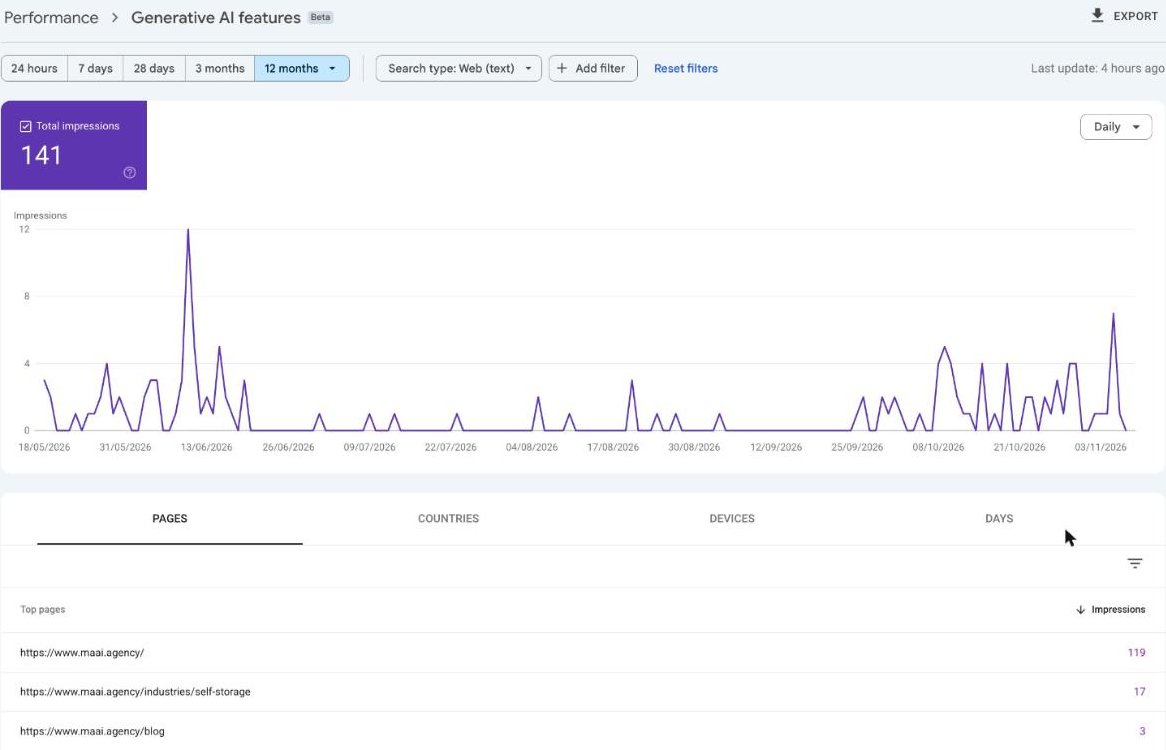
Search Console shows the searches your website appears for, your average position, and which pages get clicks. It also has a Generative AI features report, in beta at the time of writing, that shows impressions from Google's AI features by page.
- Filter your queries for "storage", "unit" and your town to see where you already appear and where you sit on page two.
- Open the Pages tab to see which location pages get impressions without clicks, then improve their titles and first paragraph.
- Use URL Inspection to check a new page is on Google and to request indexing.
- Open the Generative AI features report to see which pages appear in AI answers.
5. Google Analytics 4
Google Analytics 4 (GA4) shows how many people visit your website, where they come from and whether they enquire or reserve a unit. It only counts what you ask it to, so the key step is marking your enquiry events as key events. For the full setup, read how to track AI traffic on your website.
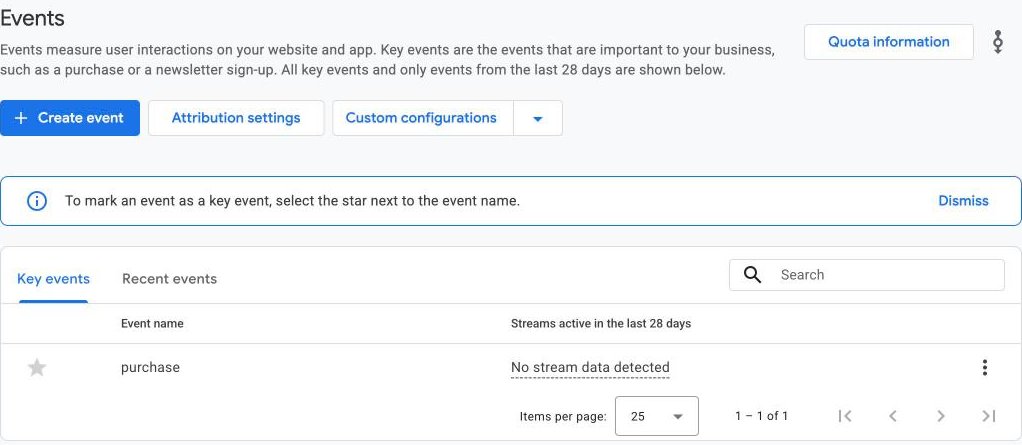
- Mark key events for reservations, enquiry forms and click-to-call. In Admin, open Events and select the star next to each one.
- Check Traffic acquisition to compare Organic Search, Direct and referrals.
- Look for AI tools as a source, such as chatgpt.com, and create an "AI assistants" channel group so their visits stay together.
- Link Search Console so your search data sits in the same place.
6. Bing Webmaster Tools
Bing Webmaster Tools is the free Search Console equivalent for Bing. Bing is one of the search sources behind ChatGPT's web search, so it is worth ten minutes.
- Import your site from Google Search Console instead of verifying it again.
- Submit your sitemap and check that your location pages are indexed.
- Review the search terms report for searches that bring Bing visitors.
7. Ahrefs Webmaster Tools
Ahrefs Webmaster Tools is free for websites you can verify. It runs a site audit and shows the backlinks pointing to your site, which helps you plan local PR and partner links.
- Verify your website with your Search Console account.
- Run the site audit and fix broken links, missing titles and duplicate pages first.
- Open the backlinks report to see who links to your facility, then ask local partners such as movers, estate agents and universities for a link to your location page.
Which free tools find keywords and fix your self storage website?
Google Keyword Planner and Google Trends show what renters search for and when, while PageSpeed Insights and Screaming Frog find problems that slow your site down or confuse Google.
8. Google Keyword Planner
Keyword Planner is free with a Google Ads account, and you do not have to run ads to use it. It shows how often people search for a phrase, and gives ideas for related searches.
- Search "self storage [your town]", "storage units near me" and "student storage".
- Pick one main phrase per location page and use it in the title, the first heading and the first paragraph.
- Add the related questions renters ask, such as unit sizes and prices, to your FAQ.
9. Google Trends
Google Trends shows when searches rise and fall, so you can time offers and posts. In the UK, interest in "self storage" rose over the last five years, while "storage units near me" stayed flat.
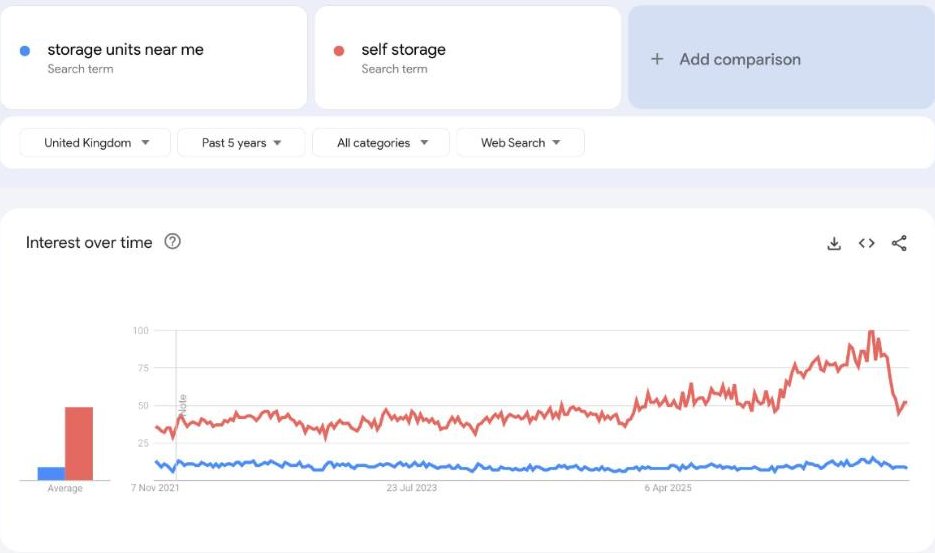
- Compare phrases such as "self storage", "student storage" and "storage near me".
- Look at the yearly pattern. Plan posts and offers for the weeks before searches rise, for example house-move season and student term ends.
- Check your region with the location filter, because demand differs by town.
10. PageSpeed Insights
PageSpeed Insights tests how fast a page loads on a phone and flags what slows it down. Most renters search on mobile, so a slow location page loses enquiries. Our own homepage scored 74 for performance on mobile when we ran it on 9 November 2026, which shows even a carefully built site has fixes to find.
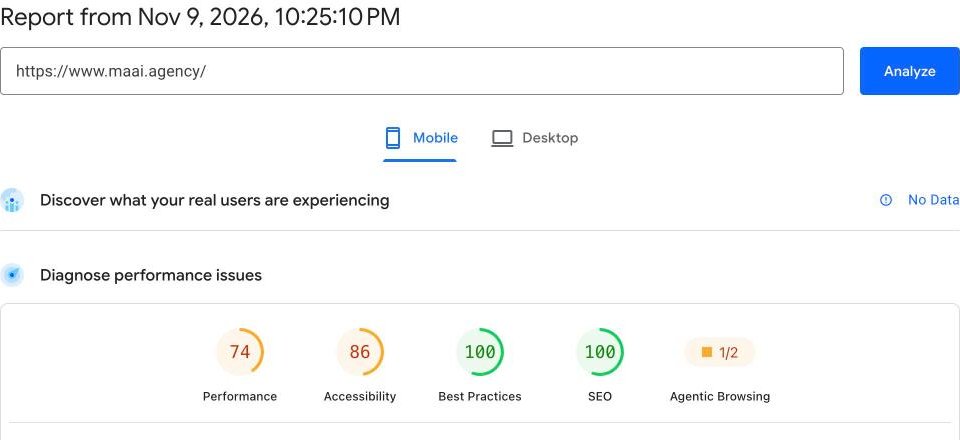
- Test your home page and each location page on Mobile.
- Fix the largest problems first, usually oversized photos and heavy scripts.
- Run it again after each change and note the score in your monthly report.
11. Screaming Frog SEO Spider (free version)
Screaming Frog is a free desktop crawler that scans up to 500 URLs, which is enough for most self storage websites. It finds broken links, missing page titles, duplicate content and redirect problems in one run.
- Crawl your website and sort by response codes to find broken pages.
- Check titles and headings on each location page so every one has its town and "self storage" in the right places.
- Look for duplicate location pages that only change the town name, and rewrite them with local detail.
How do you use these free tools together each month?
Set aside one hour on the same day each month and work through the tools in order: listing, website, keywords, then fixes. Write the numbers in one sheet so you can see the trend.
- Minutes 1 to 15, your listing: read the Google Business Profile Performance report, reply to new reviews and schedule next month's posts. Share your best post on your local Facebook page too.
- Minutes 15 to 25, AI answers: ask ChatGPT, Gemini and Claude the same three questions and note whether you are named.
- Minutes 25 to 40, your website: check Search Console clicks, impressions and the Generative AI features report, then GA4 enquiries and key events.
- Minutes 40 to 50, keywords: check Google Trends for the next season and Keyword Planner for one new phrase to add to a location page.
- Minutes 50 to 60, fixes: run PageSpeed Insights on one page and fix the top issue. Run Screaming Frog every quarter.
When are free tools not enough?
Free tools show you what is happening. They do not do the work for you, and they are built for one site at a time. They cannot track your map ranking street by street, manage reviews across many branches or build links for you. If you would rather hand the work over, compare the best AI marketing agencies for self storage.
If you are running multiple self storage sites, then you might consider premium tools for running your business efficiently. We have covered that in the next blogs to help you understand better.
Want us to look at your listing? Get a Google My Business audit done by MAAI. We check your categories, hours, location pages, reviews and local links, then send you a plan in order of impact. Book your audit
FAQ
Is Google My Business free?
Yes. Google My Business is now called Google Business Profile, and creating and managing a listing is free. People still search for "Google My Business", and it is the same listing.
Do I need paid SEO tools for a small self storage business?
No. A single facility can do well with the free tools in this guide. Paid tools become useful when you manage several sites or want to track rankings location by location.
Which free tool should I start with?
Start with Google Business Profile, because it controls your map listing. Then add Search Console and Google Analytics 4 so you can see what your website does.
How often should I check these tools?
Once a month is enough for most owners, with a quick weekly look at new reviews. Use the one-hour routine above.
Can free tools show if I appear in AI answers?
Partly. A free AI assistant shows what it says about you, and the Generative AI features report in Search Console shows impressions from Google's AI features. Neither is a full tracker, so check both monthly.
How long do free tools take to show results?
The tools give you data straight away. Changes you make from that data, such as listing fixes, usually show in weeks, and map ranking movement usually takes a few months.