

Your page can rank first on Google and still lose the click to an AI Overview, the AI summary above the results. The question is whether that summary names your brand or a competitor. An AI Overview tracker answers it by checking your searches every day or week and recording who Google quotes. This guide compares the best AI Overviews trackers in 2027, from free tools to agency platforms, and shows how to choose one and read the results.
What is an AI Overview tracker?
Google's AI Overviews are the AI-written summaries that sit above the normal results. Your page can rank first below one and still lose the click, so a normal rank tracker only tells you half the story. An AI Overview tracker adds the missing half: who Google quotes, how often and for which searches.
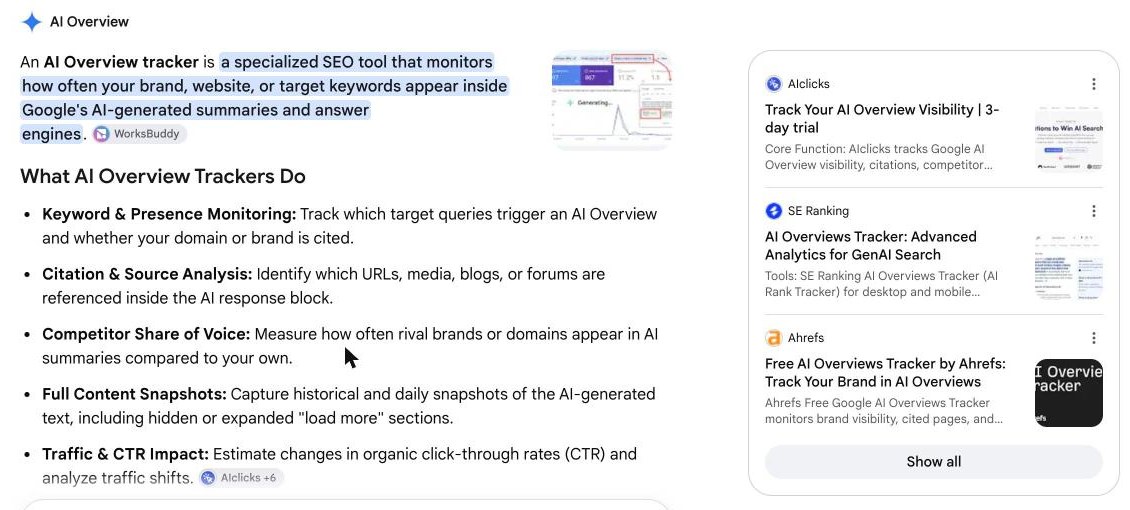
Google's own AI Overview for "ai overviews trackers" describes the job in the same way. It lists keyword and presence monitoring, citation and source analysis, competitor share of voice, content snapshots and traffic impact as the five things these tools do.
Why do you need an AI Overviews tracker?
You need one because AI Overviews cost clicks and change fast, and Google does not give you a keyword-level view of either. Ahrefs found that when an AI Overview appears, the top-ranking page gets 58% fewer clicks (December 2025 data), up from a 34.5% drop in its first study in April 2025. Its separate volatility study found the answers themselves keep moving.
In plain English: an AI Overview you check by hand on Monday may be a different answer, with different sources, by Wednesday. A one-off search tells you very little. A tracker repeats the check every day or week, so you see a trend instead of a lucky or unlucky snapshot.
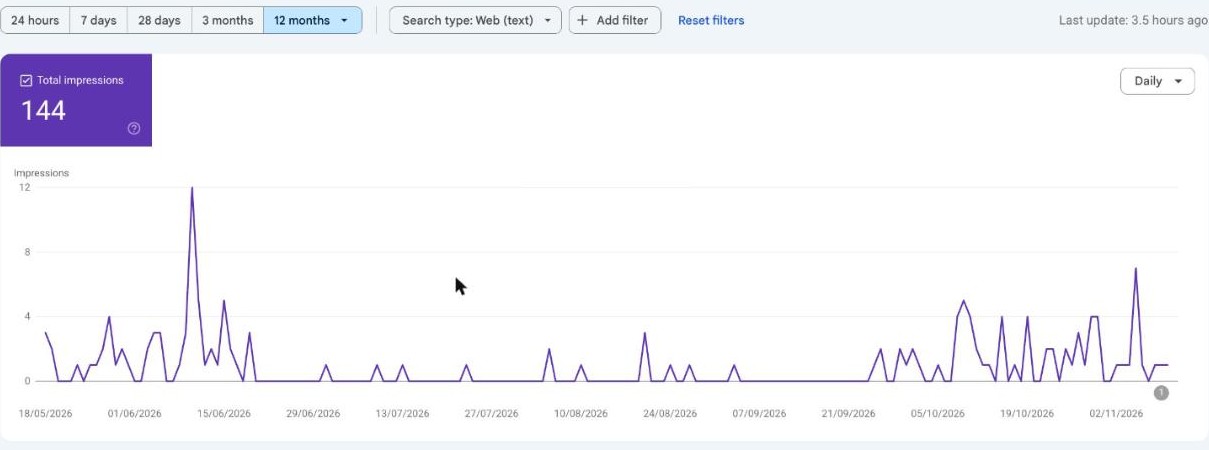
Google Search Console now has a separate Generative AI features report (beta). It is useful, but it shows impressions only, split by page, country, device and day. In our own account it shows 144 impressions for maai.agency between 18 May and 14 November 2026. It does not show which competitors are cited next to you, so it works as a baseline, not a tracker.
What are the best AI Overviews trackers in 2027?
The best AI Overviews tracker depends on your budget and on whether you already pay for an SEO suite. We checked each tool's own public page on 14 November 2026. Prices and limits change often, so confirm them before you buy.
| Tracker | Starting point | What it does for AI Overviews | Best suited to |
|---|---|---|---|
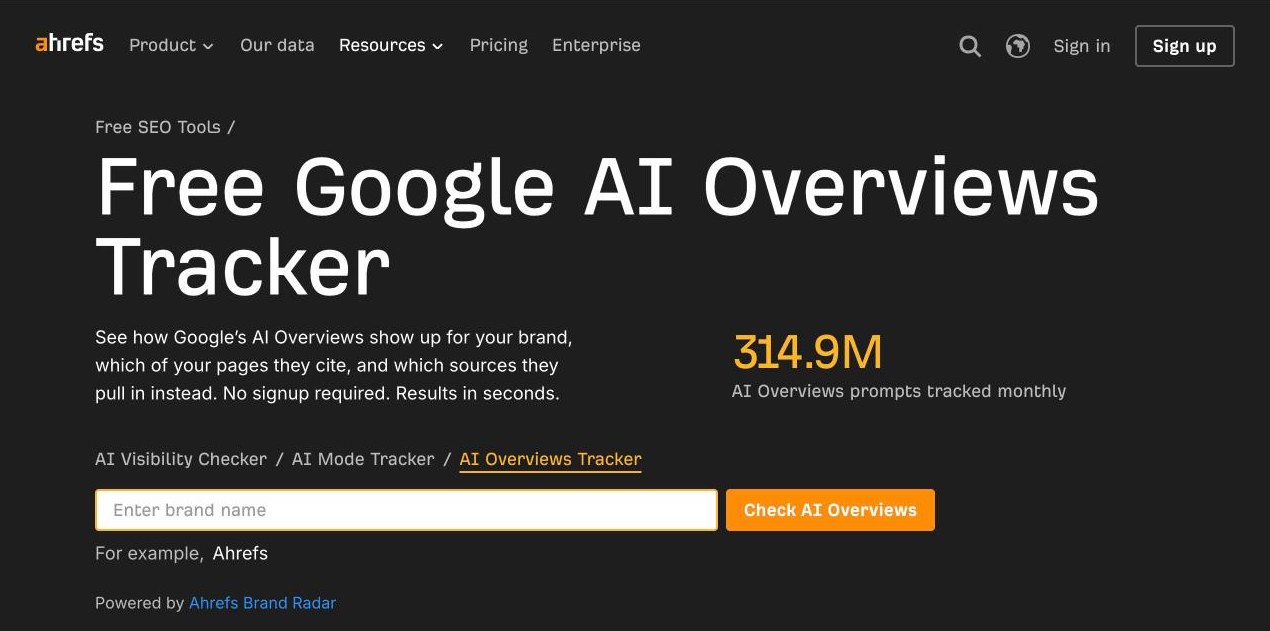
| Ahrefs Free AI Overviews Tracker | Free, no signup | Preview of mentions over time, top 5 topics, top 5 cited domains and top 5 cited pages for a brand | A first look at your brand |
| SE Ranking AI Overviews Tracker | Free check: 5 a day. Free trial, no card | Shows if an AI Overview appears for a keyword, where your site sits in it, and which sources and competitors are cited | Teams tracking keywords across several countries |
| Seobility AI Overview Tracker | 14-day free trial | Shows when an AI Overview appears for your tracked keywords, its full text, the cited websites and their order | Small sites that want the full answer text |
| AIclicks | 3-day free trial | Tracks AI Overview visibility, citations, competitor share of voice and AI-driven traffic through GA4 | Teams that want traffic and visibility together |
| SEOmonitor | Paid, see its pricing page | Daily tracking with click-impact estimates, full content snapshots and competitor detection | Agencies that report to clients |
| Ahrefs Brand Radar | From £159 a month for chosen platforms, £560 for all platforms | Daily AI Overviews tracking, competitor benchmarking and custom prompts | Teams already on Ahrefs |
| OtterlyAI | From $29 a month | Tracks Google AI Overviews with ChatGPT, Perplexity and Copilot, daily | Small businesses on a budget |
| Peec AI | From €85 a month | Brand visibility, position and sentiment, with Google AI Overviews as one of the models you can pick | Marketing teams that want clean reports |
Prices for OtterlyAI and Peec AI are the Lite and Starter plans we checked on 12 November 2026 for our comparison of AI search monitoring tools, which also covers Semrush, SE Visible and Profound.
Which AI Overview tracker is free?
Three are free to start. The Ahrefs Free Google AI Overviews Tracker needs no signup and gives a limited preview for one brand. SE Ranking lets you run 5 free keyword checks a day, with your country, language and desktop or mobile. Seobility gives a 14-day trial. All three are enough to learn what an AI Overview tracker shows before you pay for anything.
Which AI Overview tracker suits an agency or a larger team?
SEOmonitor, Ahrefs Brand Radar and SE Ranking suit teams that report to clients or run many keywords, because they keep daily history and compare competitors. Brand Radar's published prices are from £159 a month for chosen platforms and £560 a month for all platforms, before tax. It also lets you add your own prompts, so you can follow the exact questions your buyers ask.
Which AI Overview tracker suits a small business?
OtterlyAI and Peec AI are the clearest low-cost starts, at $29 and €85 a month. They track Google alongside other AI assistants, which helps if your customers use more than one. If you only care about Google, the free tools above plus a monthly check are a sound start.
Do AI Overview trackers agree with each other?
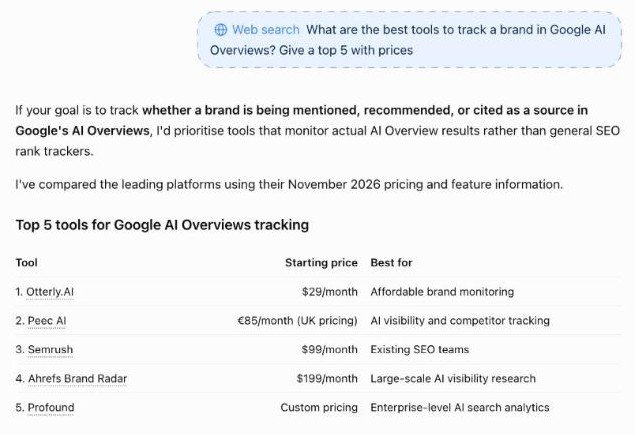
No, and the lists you read about them do not agree either. We asked Google and ChatGPT the same question on 14 November 2026. Google's AI Overview named Ahrefs, SE Ranking, Seobility, AIclicks, SEOmonitor and Keyword.com. ChatGPT, with web search on, named OtterlyAI, Peec AI, Semrush, Ahrefs Brand Radar and Profound. Only Ahrefs appeared in both.
That gap is the reason this category exists. What an AI assistant recommends depends on which assistant you ask, how you word the question and the day you ask. Treat any single list, including ours, as a starting shortlist and check each tool's own page.
What should an AI Overview tracker show you?
A useful AI Overview tracker answers five questions about each search you follow: does an AI Overview appear, are you mentioned, are you cited, who else is cited and how has that changed. If a tool cannot answer all five, you will end up checking by hand.
- AI Overview presence. Which of your keywords trigger an AI Overview, so you know where it matters.
- Your mentions and citations. Whether the answer names your brand and whether it links to your page. These are different.
- Competitors and cited sources. Which brands and websites Google trusts for the topic.
- Full text snapshots. A saved copy of each answer, so you can see how it changed.
- History by country and device. AI Overviews vary by location, so a UK check and a US check can differ.
Also look at the difference between keyword-based and prompt-based tracking. Keyword tracking follows short searches such as "ai overviews trackers". Prompt tracking follows full questions, the way people talk to AI. Ahrefs runs both indexes in Brand Radar, and the best set-up for most businesses uses both.
How do you choose an AI Overview tracker?
Choose the tracker that covers the countries you sell in, fits your budget and shows the five items above. Start with a free tool, then move to a paid one only when you have more keywords than you can check by hand.
- List 20 to 30 searches your buyers use
Mix short keywords with full questions. Include the searches that bring you leads today, not only broad topics.
- Run them through a free tool first
Use the Ahrefs and SE Ranking free checks or a Seobility trial. Note how many of your searches trigger an AI Overview at all.
- Compare two paid tools on the same list
Most offer a trial. Run the same searches in both and see which shows citations and competitors more clearly.
- Check price per tracked search
Divide the monthly price by the number of searches or prompts it covers, and confirm whether Google AI Mode is included or an add-on.
How do you track AI Overviews for free?
You can track AI Overviews for free with Google Search Console, the free checks above and a monthly manual routine. It takes about an hour and gives you a trend without any subscription.
- Open the Generative AI report
Search Console > Performance > Generative AISet the range to 3 months and note the impressions. This is your baseline for how often Google shows your pages in AI features.
- Run your searches on Google
Search each keyword in a private window with the same country and language settings every month. Write down whether an AI Overview appears and whether you are named.
- Save the answer and its sources
Copy the text and the cited sites into a sheet with the date. Over three months you will see which sources keep returning.
- Run the free tools on your brand
Use the Ahrefs free tracker for your brand name and a SE Ranking check for your top keywords. Add the results to the same sheet.
- Compare with your traffic
Match the months against organic clicks and sessions from AI assistants in Google Analytics 4. Our guide to tracking AI traffic for free shows the set-up.
How do you read your AI Overview tracker results?
Read them as a trend over weeks, never as a verdict from one day. Because an AI Overview has a 70% chance of changing between checks, a single missing mention means little. Three or four weeks in a row of being absent for a search that matters is the signal to act.
- A valuable search where an AI Overview shows and you are never cited
- The same competitor cited for several weeks
- Your impressions in Search Console falling while the number of AI Overviews rises
- One missing mention on a single day
- A different list of cited sources after a few days
- A tool disagreeing with another tool or with your own search
Track your visibility score alongside these checks. Our guide to the SEO visibility score explains how to read it in Google and AI search.
What should you do when an AI Overview tracker shows you are missing?
Improve the page that should be cited, then recheck after a few weeks. AI Overviews pull from pages Google already trusts, so the work is the same as ranking: answer the question in the first lines, cover the related questions and earn mentions elsewhere. Our guide to ranking in Google AI Overviews and AI Mode lists the steps, and our guide to tracking brand mentions in AI search covers what happens outside Google.
If you would rather not appear at all, see how to turn off AI Overviews on Google, which also covers the site owner opt-out.
FAQ
How do you track AI Overviews?
Use a tracker that runs your searches on a schedule and records whether an AI Overview appears and whether you are cited, such as the Ahrefs free tracker, SE Ranking, Seobility or SEOmonitor. For a free start, add Google Search Console's Generative AI features report and a monthly manual check on Google.
Is there a free AI Overview tracker?
Yes. Ahrefs offers a free Google AI Overviews Tracker with no signup, SE Ranking gives 5 free keyword checks a day and Seobility has a 14-day free trial. The free versions show a limited preview.
Does Google Search Console track AI Overviews?
Search Console has a Generative AI features report (beta) that shows impressions by page, country, device and day. It does not show competitors or the full AI Overview text, so it works as a baseline next to a tracker.
Can AI Overviews be trusted?
Treat them as a starting point. Google marks AI responses as possibly containing mistakes, and Ahrefs found they change often, so check important facts at the source.
What is the difference between an AI Overview tracker and an AI Mode tracker?
AI Overviews are the summary above the normal results, with the usual links below. AI Mode is a separate conversational experience with fewer sources. They trigger on different searches and cite different sources, so a brand can appear in one and not the other, and some trackers cover both.
How often should you check AI Overviews?
Daily or weekly with a paid tracker, monthly by hand. Because the answers change within days, repeat checks over several weeks before you judge a result.
How can you avoid AI Overviews?
You can use the Web filter or add -ai to a search, and site owners can limit how their content is used. Our guide to turning off AI Overviews on Google explains each method.