

A good SEO report answers one question in the first minute: is search bringing in more business? Too many reports open with rankings and traffic charts and leave you to guess. This SEO report template gives you seven sections in the right order, shows real examples from Google, ChatGPT and Search Console, and ends with a checklist you can use on any report, including the one your agency sends you.
What is an SEO report template?
Most templates are a spreadsheet, a slide deck or a dashboard. The format matters less than the questions the report answers. If a report cannot tell you whether SEO brought in more enquiries this month, it is a data dump, whatever it looks like.
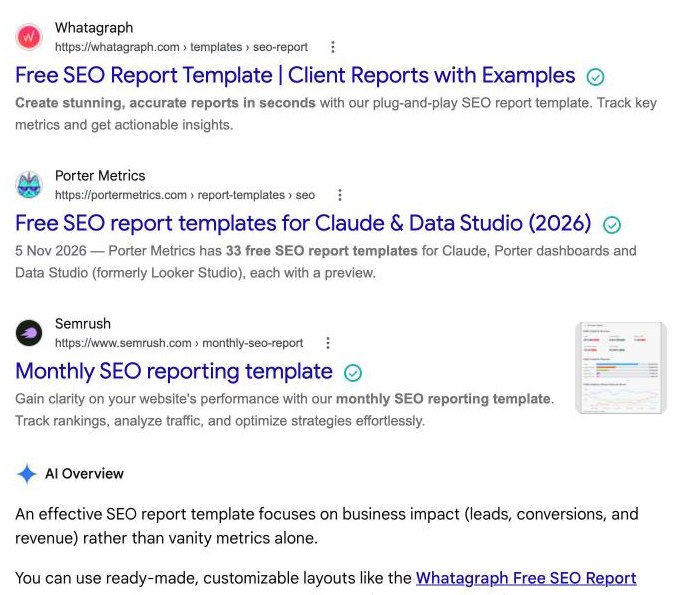
A search for "seo report template" in Google UK shows how crowded this space is. Whatagraph, Porter Metrics and Semrush all offer free layouts, and Google's AI Overview sums up the advice in one line: focus on business impact rather than vanity metrics.
What should a monthly SEO report include?
A monthly SEO report should include seven things: a one-paragraph summary, enquiries and sales from search, organic traffic, search visibility, AI search visibility, technical health and a plan for next month. Put the business result first and the supporting detail after it.
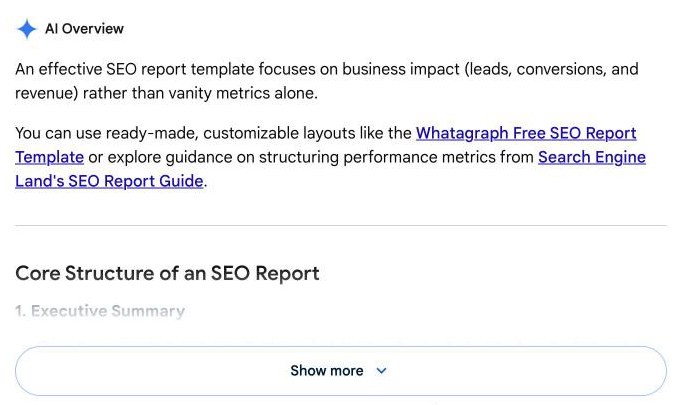
Google's AI Overview for the same search lists a similar structure, starting with an executive summary and top-line results such as leads, conversions or revenue, then traffic, rankings, technical health and next steps.
We have kept the same order in the template below, with one addition most templates still skip: a section for how you appear in AI answers.
What are the 7 sections of a good SEO report template?
| Section | What to show | The question it answers |
|---|---|---|
| 1. Summary | Three or four sentences: what changed, why, what happens next | Is SEO working this month? |
| 2. Business results | Enquiries, calls, bookings or sales from organic search, compared with last month and last year | Is search bringing in business? |
| 3. Organic traffic | Organic sessions and the top landing pages in Google Analytics 4 | Are the right people visiting? |
| 4. Search visibility | Clicks, impressions, click-through rate and average position in Search Console, split into brand and non-brand searches | Are more people finding us on Google? |
| 5. AI search visibility | Whether your brand appears in AI Overviews and AI answers for your key searches, and which pages get cited | Are we in the answers buyers read? |
| 6. Technical health | Indexing problems, page speed and crawl errors, only where something changed | Is anything blocking us? |
| 7. Work done and next steps | Pages published, fixes made, links earned, then the plan and priorities for next month | What did we do and what comes next? |
How do you write the summary and business results sections?
Write the summary last and keep it to a short paragraph a busy owner can read in a minute. Say what moved, the most likely reason and what you will do next. Then show business results straight after it, because that is what the report is for.
- Name the result. "Organic enquiries rose from 18 to 24" tells the reader more than "traffic is up 12%".
- Compare like with like. Show this month against last month and against the same month last year, so seasonal swings do not mislead you.
- Count the real conversions. Use form fills, calls, bookings or sales that you record in Google Analytics 4 or your CRM, and say how each was counted.
- Admit what fell. A fall with a reason and a fix builds more trust than a report that only shows good news.
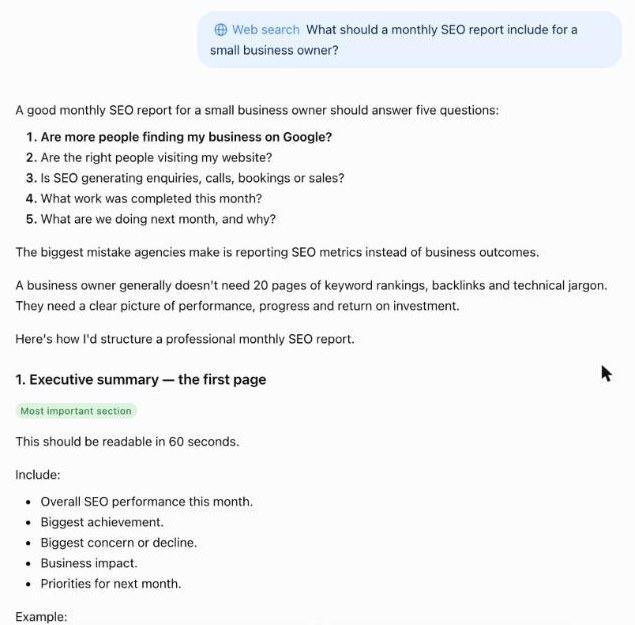
ChatGPT gives the same advice when asked what a small business owner needs from a monthly report. It frames the report around five questions, from whether more people are finding the business on Google to what happens next month.
How do you report traffic and search visibility in Search Console?
Use Google Search Console for visibility and Google Analytics 4 for what visitors do next. Search Console shows how often your site appears in Google results and how often people click. Analytics shows what they did on your site and which visits turned into enquiries.
Which Search Console numbers belong in the report?
Four numbers: total clicks, total impressions, average click-through rate and average position. Open the Performance report, set the date range to the last month and compare it with the previous period. Then add a filter to separate brand searches from searches that do not include your name.
- Open the Performance report
Search Console > Performance > Search resultsIn Search Console choose Performance, then Search results.
- Set the dates
Pick the last full month, then tick Compare and choose the previous period.
- Split brand from non-brand
Add a Query filter that excludes your company name, so you see searches from people who did not already know you.
- Note the pages
Open the Pages tab and record the five pages that earned the most clicks.
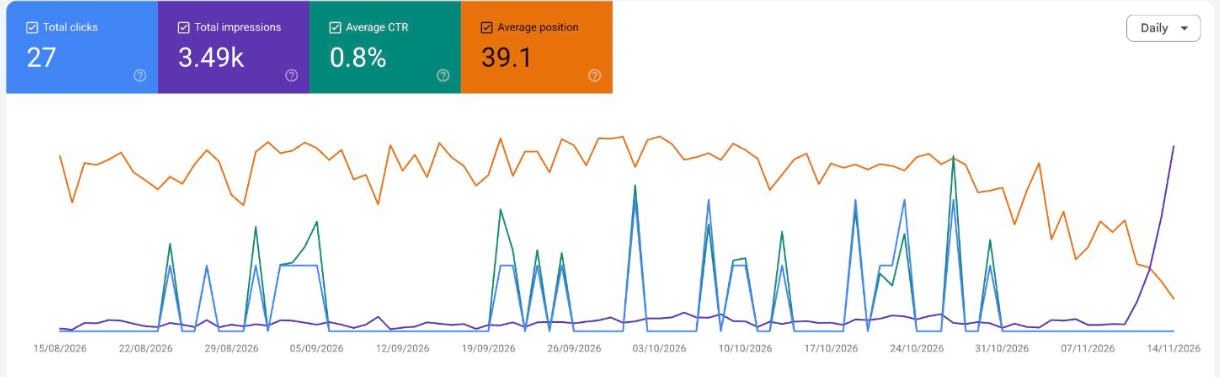
Our own site is a fair example of why context matters. Over three months to 14 November 2026, maai.agency recorded 27 clicks from 3.49 thousand impressions, a click-through rate of 0.8% and an average position of 39.1. Impressions are climbing while position is still low, which is typical for a young site. A report that only said "impressions are up" would hide how few clicks that has produced.
How do you report AI search visibility?
Add a short AI section that records whether your brand is named or cited in AI Overviews and AI assistants for five to ten key searches. Impressions and clicks alone no longer tell the full story, because an answer can mention you without sending a visit.
The reason is the way people click now. Pew Research Center found users clicked a traditional result in 8% of visits when an AI summary appeared, against 15% when it did not. A flat click line can therefore hide growing visibility, and a visibility line can hide falling clicks.
- Pick your searches. Choose five to ten questions your buyers ask, and keep the same list every month.
- Record the result. Note whether an AI Overview appears, whether you are named and which pages are cited.
- Track AI visits. Follow our guide to tracking AI traffic for free to see AI referrals in Google Analytics 4.
- Use a tool when the list grows. Our comparison of AI Overview trackers shows what to use once manual checks take too long.
If you want to understand the score some tools produce from these checks, read our explainer on what a good SEO visibility score looks like, and for how to improve the result see how to rank in Google AI Overviews.
How do you check if your agency's SEO report is any good?
A good SEO report puts results first, explains every movement in plain English and ends with next steps you can approve. Check it against the list below before you accept it, and ask for changes if more than two items are missing.
- Enquiries come first. Leads, calls or sales from search appear on page one.
- A short summary. You can read it in a minute and understand what changed.
- Comparisons. This month is shown against last month and last year.
- Brand and non-brand are split. You can see growth from people who did not already know you.
- Pages are named. You know which pages earn clicks and enquiries.
- AI visibility is covered. The report says whether you appear in AI answers.
- Technical changes are explained. Issues come with what was fixed.
- Work done is listed. You can see what was published, fixed or earned.
- Next month's plan is clear. Priorities are specific and ranked.
- Rankings are in context. Keyword positions support the story and do not replace it.
How often should you send or read an SEO report?
Send a short report every month and review it properly every quarter. Monthly checks catch problems early. SEO results build slowly, so quarterly reviews show the trend that a single month cannot, and they are the moment to agree changes to the plan.
Which free SEO report template should you start with?
Start with the layout above in a spreadsheet or a Google Looker Studio dashboard, then adapt it to your business. Search Engine Land, Whatagraph, Porter Metrics, Semrush and Swydo all publish free templates, and each connects Search Console and Google Analytics 4. Choose the one that lets you put enquiries on page one.
Whichever you pick, change two things: move business results to the top and add the AI visibility section. Most templates still lead with rankings and traffic.
FAQ
What is an SEO report template?
An SEO report template is a ready-made layout for monthly SEO results. It lists the sections to complete each month, such as a summary, enquiries, traffic, visibility, technical health and next steps, so reports are consistent and easy to compare.
What should a monthly SEO report include?
It should include a short summary, enquiries or sales from search, organic traffic, Search Console clicks and impressions, AI search visibility, technical health and a plan for next month.
How long should an SEO report be?
For a small business, two to four pages is enough. Put the summary and business results on the first page and keep the detail for the pages behind it.
Which metrics matter most in an SEO report?
Enquiries and sales from organic search matter most. After that come clicks, impressions, click-through rate and average position from Search Console, and organic sessions from Google Analytics 4.
How do you make an SEO report in Excel or Google Sheets?
Create one tab per section, export your Search Console and Google Analytics 4 data each month, paste it in and add a column that compares it with last month. Write the summary at the top.
Can ChatGPT write an SEO report?
ChatGPT can help draft the summary and spot patterns in data you paste in, but you still need to pull the numbers from Search Console and Google Analytics 4 and check them yourself.
Should an SEO report include AI search visibility?
Yes. Record whether your brand is named or cited in AI Overviews and AI assistants for a fixed list of key searches, because clicks alone no longer show how visible you are.