
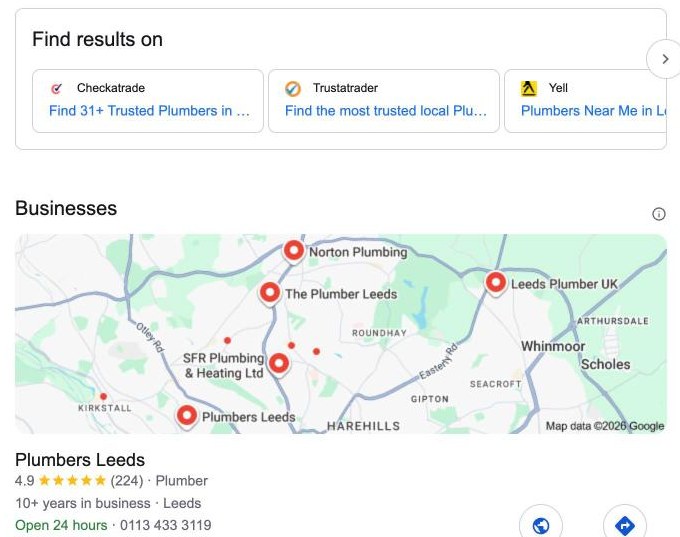
A customer types "plumber in Leeds" into Google, sees three businesses on a map and calls one of them. If you are not one of the three, you lose that job before you know it existed. This local SEO checklist gives small businesses 20 steps in the right order: your Google Business Profile, your website, your listings, your reviews, local links, AI answers and tracking. Work through it once, then repeat the monthly check.
What is a local SEO checklist?
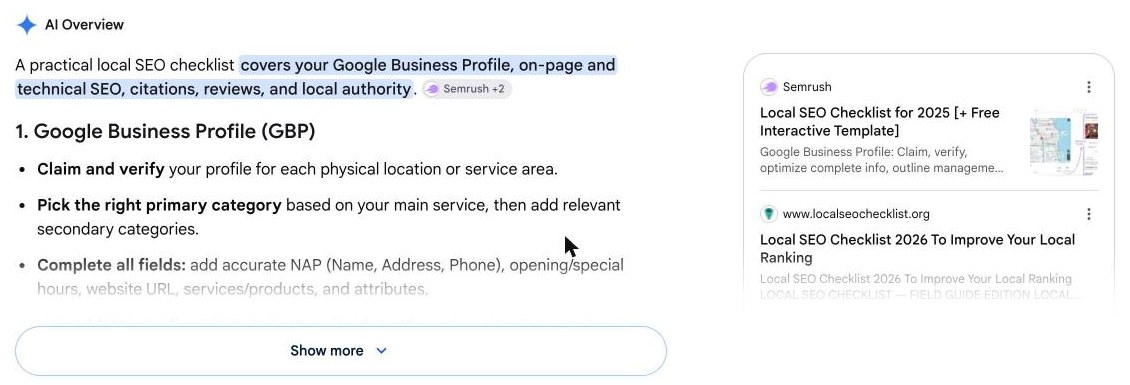
Google's AI Overview for the search "local seo checklist" gives the same shape. It groups the work into Google Business Profile, on-page and technical SEO, citations, reviews and local authority. That is a sound list, and this guide turns each group into specific steps you can tick off, in the order we would do them.
Do people search for a local SEO checklist or for local SEO?
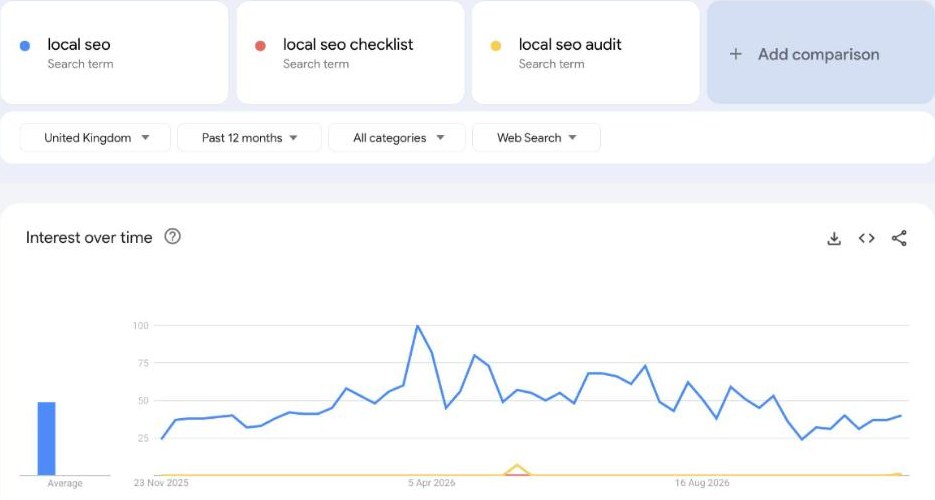
People search for "local seo" far more often than for "local seo checklist". In Google Trends for the UK over the past 12 months, "local seo" shows steady interest while "local seo checklist" and "local seo audit" barely register. Most people start with the broad topic, so use the words your customers type, such as "plumber in Leeds" or "dentist near me", in your headings and listings, and keep "checklist" for how you manage the work.
What does Google look at to rank a business in the map pack?
Google ranks map results on relevance, distance and prominence. Relevance is how well your profile matches the search, distance is how close you are to the searcher, and prominence is how well known and trusted you look online. The Whitespark Local Search Ranking Factors 2026 survey of local SEO experts puts your primary category and proximity at the top, with reviews and behavioural signals gaining weight.
The map pack is the block of three businesses with a map that appears above the normal results for searches such as "plumber in Leeds". You cannot change where the searcher stands, so the checklist below works on the other two: matching the search and looking trustworthy.
What are the 20 steps in a local SEO checklist?
Work through the groups in order. Google Business Profile comes first because it feeds the map pack directly, and tracking comes last because it tells you what to fix next.
Google Business Profile: steps 1 to 6
Your Google Business Profile is the free listing that appears on Google Search and Maps. A complete, accurate profile is the single biggest lever for map results, so finish it before touching anything else.
- 1. Claim and verify your profile. Search for your business on Google Maps, claim the listing or create it, and complete Google's verification so you can edit it.
- 2. Choose the right primary category. Pick the category that matches your main service, such as "Plumber" rather than "Home services". Add secondary categories only for services you really offer.
- 3. Fill in every field. Add your exact name, address, phone number, website, opening hours and special hours. Use the same details your website shows.
- 4. List your services and products. Add each service with a short description in plain words, so the profile matches the searches people make.
- 5. Upload real photos. Add photos of your premises, your team and finished work. Replace stale ones as things change.
- 6. Keep the profile active. Post updates, change hours for bank holidays and check the profile each month for edits or suggested changes.
Website: steps 7 to 11
Your website confirms what the profile says. Each location or service area needs a page that tells Google and customers what you do and where.
- 7. Put your location in the key places. Use your main service and town in the title tag, the H1 and the opening paragraph of your pages, where it reads naturally.
- 8. Build a page for each service and each location. One helpful page per core service, and one per branch or main area. Skip thin pages that only swap the town name.
- 9. Show your details consistently. Put your name, address and phone number in the footer and on a contact page, matching the profile exactly.
- 10. Add LocalBusiness schema. Structured data with your name, address, phone number, hours and map coordinates helps search engines read the page. It is a clarity step, not a ranking trick.
- 11. Make the site fast on a phone. Many local searches happen on a phone. Compress images, test the page speed and add a click-to-call button.
Listings and citations: steps 12 and 13
A citation is any mention of your business name, address and phone number on another website, such as a directory. Consistent citations show Google that your details are real and agree everywhere.
| Where to list | Why it helps | What to check |
|---|---|---|
| Bing Places | Feeds Bing and tools that use Bing data | Import from your Google profile and confirm the details match |
| Apple Business Connect | Puts you on Apple Maps | Claim the listing and add hours and photos |
| Yell and trade or industry directories | Adds trusted mentions that match your trade | Choose directories real customers use in your area |
| Local chamber or council pages | Adds a local, trusted source | Ask for a link to your website |
- 12. Audit your details. Search your business name and phone number, list every place that shows them and fix any old address, number or name.
- 13. Claim the core listings. Set up the platforms in the table above, then add directories your competitors appear in and you do not.
Reviews: steps 14 and 15
Reviews help you rank and decide who gets the call. The BrightLocal Local Consumer Review Survey 2026 found that 97% of consumers read online reviews for local businesses, and that 74% look for reviews written in the last three months. Fresh reviews matter as much as the total.
- 14. Ask every happy customer for a review. Send the direct review link by text or email right after the job. Ask the same day, while the experience is fresh.
- 15. Reply to every review. Thank people by name for good reviews and reply calmly and factually to poor ones. Replies show future customers how you treat people.
Local links and mentions: steps 16 and 17
Prominence comes from other trusted sites talking about you. Local mentions also feed the sources that AI assistants read.
- 16. Earn local links. Look for local press, community groups, suppliers, partners and sponsorships that can link to your website.
- 17. Use local social pages. Keep a Facebook page up to date and take part in local community groups with useful answers. Link back to your site where the group allows it.
AI answers and tracking: steps 18 to 20
- 18. Write one clear description of your business. Use the same short description on your site, your profile and your listings, naming your trade, town and what makes you different.
- 19. Track calls, directions and website clicks. Read the performance figures in your Google Business Profile each month and add UTM tags to the website link so GA4 shows visits from your profile.
- 20. Review your checklist every month. Note what changed, fix any new inconsistencies and add one improvement, such as a new service page or a batch of review requests.
How do you start local SEO for a small business?
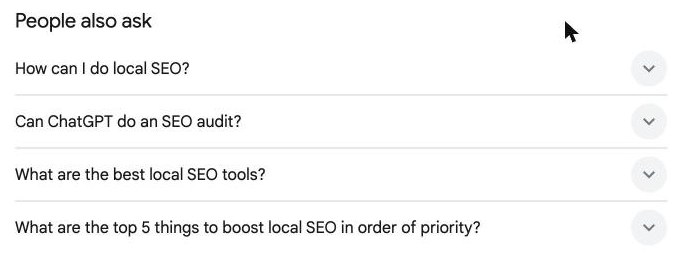
Start with your Google Business Profile, then your website and listings. Google's People Also Ask box for "local seo checklist" shows the questions beginners ask first, including how to do local SEO, which tools to use and what to prioritise. The answer to all three is the same: fix the profile, make your details match everywhere, then collect reviews.
How do you show up in AI answers for local searches?
AI assistants answer local questions from your website, your profile and the directories that copy them, so accurate details everywhere are the main job. A Yext study of 6.8 million AI citations found that business websites and business listings made up 86% of the sources cited by ChatGPT, Gemini and Perplexity.
The Whitespark Local Search Ranking Factors 2026 report also added AI search factors for local businesses, which favour clear service pages and mentions on trusted local and industry sites. Match the checklist to each surface:
- Google map results. Decided by your profile, category, distance, reviews and the details on your site.
- Google AI Overviews and AI Mode. Pull from pages that answer the question directly, so write each service page with a clear answer first. Our guide on how to rank in AI Overviews covers the steps.
- AI assistants such as ChatGPT. Use listings and web pages to name local providers, so consistent details and trusted mentions matter. See our guide on how to rank in ChatGPT.
How do you track local SEO results?
Track three things each month: how people find your profile, how many act on it, and how many arrive on your website. The profile shows calls, direction requests and website clicks. Search Console shows the searches and pages that bring organic visits, and GA4 shows what those visitors do. If you want to follow AI referrals too, our guide to tracking AI traffic for free shows the setup, and our SEO report template shows what to put in a monthly summary.
- Profile figures. Note calls, direction requests and website clicks from your Google Business Profile.
- Map position. Search your main service and town in a private window and record where you appear.
- Reviews. Count new reviews, check every one has a reply and send the next batch of requests.
- Listings. Check your name, address and phone number still match on your site, Bing Places and Apple Business Connect.
- Website data. Check Search Console impressions and clicks for your local pages and GA4 visits from your profile link.
How long does local SEO take?
Small changes to your profile can show up within days or weeks, while steady map and organic rankings usually take a few months of consistent work. The timing depends on your competition and how complete your profile was to begin with. Treat the checklist as a monthly habit, not a one-off project.
What should you do first with a local SEO checklist?
Do steps 1 to 3 this week: claim your profile, choose the right primary category and make your details match your website. Then ask your next five customers for a review. Those two actions move the factors Google weighs most and cost nothing. For businesses that need a deeper profile plan, our Google My Business guide for self storage shows how a full profile build works, and our guides for estate agents and moving companies show how it applies to specific trades.
FAQ
What is the first step in a local SEO checklist?
Claim and verify your Google Business Profile. It feeds the map pack directly, and you cannot edit your details, reply to reviews or see performance figures until you have verified it.
How do I rank in the Google map pack?
Match the search with the right primary category and services, be close to the searcher, and look trustworthy with accurate details and fresh reviews. You cannot change distance, so focus on the profile, reviews and consistent details across the web.
Do I need a website for local SEO?
A website helps because it confirms your services, location and contact details and gives Google and AI assistants a page to read. A complete Google Business Profile can still bring calls and direction requests without one.
How often should I ask for reviews?
Ask every customer once the job is done. There is no set number, but steady new reviews matter because 74% of consumers look for reviews from the last three months (BrightLocal 2026).
Is local SEO the same as SEO?
They overlap. Local SEO adds the work that matters when your customers are nearby, such as your Google Business Profile, local listings and location pages, on top of normal SEO for your website.